This week's HighLevel updates, explained for mortgage professionals. We cut through the noise and tell you what actually matters for your business, what you can ignore, and what to set up right now.
This week's Weekly Breakdown is all about giving you faster ways to follow up, track communication, and keep your workflow tight inside HighLevel. No major redesigns. No features that need a full training session. Just clean, useful upgrades.
Whether you're triggering automations from a phone call, managing WhatsApp replies, saving documents to contact records, or right-clicking inside the workflow builder, these updates are simple but meaningful. They speed up the work you already do and remove extra clicks you didn't need in the first place.
Let's dig in.
Trigger Workflows From Mobile Calls

What Changed:
You can now trigger workflows using custom call dispositions at the end of any mobile call. These show up automatically on the call summary screen in the HighLevel mobile app.
Why It Matters for LOs:
Perfect for fast post-call follow-up
Custom dispositions like "Send App Link" or "Request Docs" can now launch automations
Cuts down on manual tagging or task creation
Tip:
Set up your custom dispositions under Phone Settings > Voice, then use the "Custom Disposition" trigger inside workflows.
Auto-Replies on WhatsApp for Missed Calls

What Changed:
WhatsApp now supports automatic reply messages when someone calls and you don't answer. You can load a template and send it instantly.
Why It Matters for LOs:
Keeps international leads warm without needing to chase them
Matches how many loan teams already use WhatsApp
Expands missed call automation beyond just SMS
Tip:
Add this to the same automation you use for missed calls via text for full coverage.
Save WhatsApp Media to Contact Documents

What Changed:
Any media sent or received through WhatsApp can now be saved directly to the contact's document section in HighLevel.
Why It Matters for LOs:
Consolidates communication history in one place
Keeps important files like PDFs or income docs attached to the contact
Makes follow-up easier and cleaner
Tip:
Train your team to save relevant media during or after conversations for better documentation.
Right Click Workflow Actions

What Changed:
You can now right-click on any action in the workflow builder to access edit, delete, or move options.
Why It Matters for LOs:
Cuts down on clicks when building or adjusting workflows
No more hunting for the tiny three-dot menu
Works in both standard and advanced builder modes
Tip:
Use this when making fast edits to cloned workflows or snapshots.
Rich Text Editor for Notes
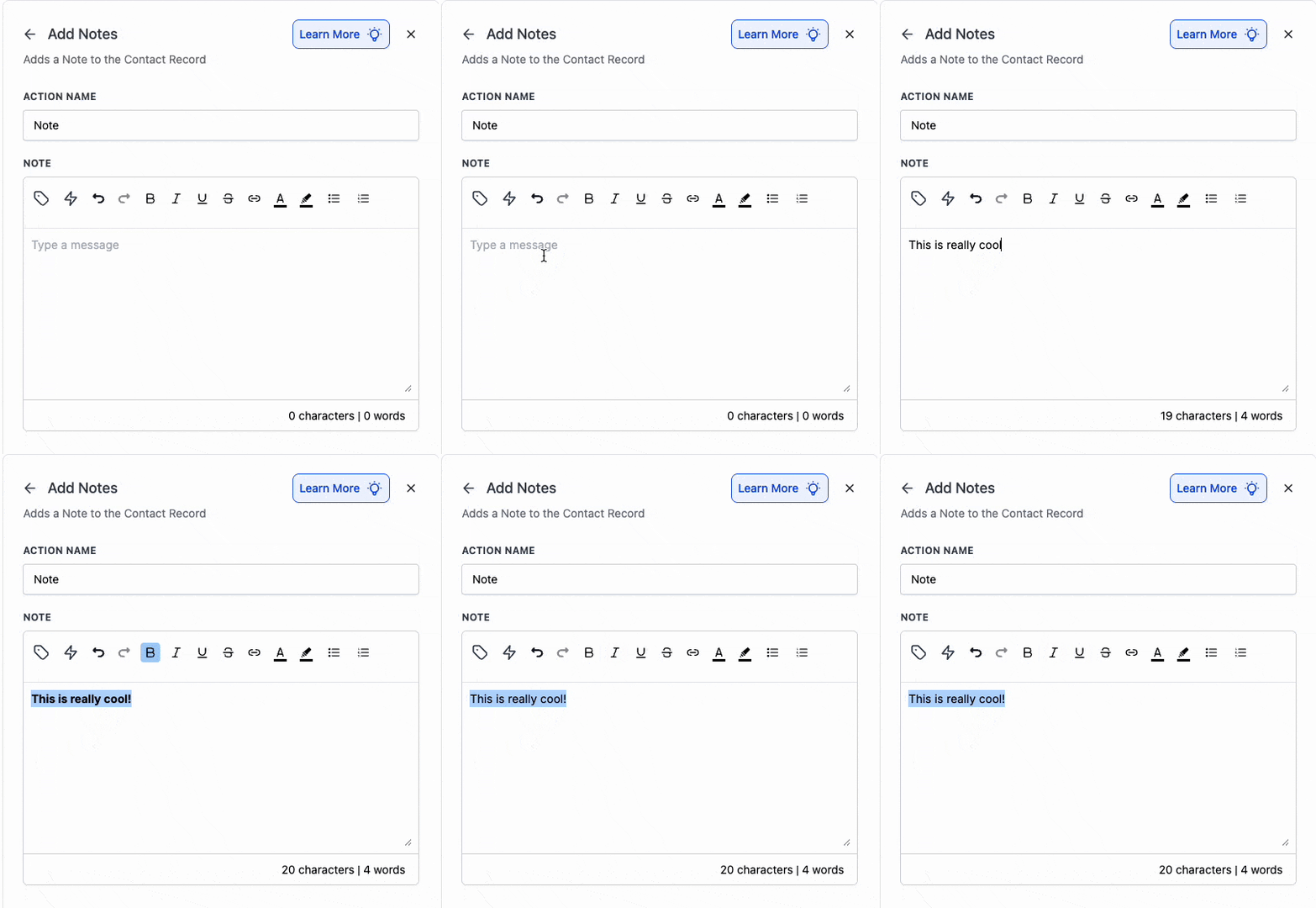
What Changed:
Workflow-generated notes can now be formatted using rich text options like bold, italic, underline, bullets, numbered lists, and links.
Why It Matters for LOs:
Notes are cleaner and easier to read
Great for internal handoffs or detailed client records
Matches the formatting available in manual notes
Tip:
Use formatting to highlight key details like call outcomes, follow-up steps, or loan milestones.
Google Lead Ads Sync With HighLevel

What Changed:
You can now connect Google's lead ad forms directly to HighLevel. Leads go straight into your CRM without needing Zapier or a landing page.
Why It Matters for LOs:
Easier setup for new lead gen campaigns
Reduces cost and friction on ad workflows
Works like Facebook Lead Ads but for Google
Tip:
Test the lead quality before scaling. Expect quantity to go up, but quality may vary.
Transfer Out Domains Without Support Tickets

What Changed:
Users can now transfer domains out of HighLevel without contacting support. You get an authorization code and can move your domain to another registrar.
Why It Matters for LOs:
Full control over your domain
No more lock-in if you switch agencies or accounts
Cuts out delays from support bottlenecks
Tip:
Always use a domain tied to your brand, and now you can move it wherever you need.
Why These Updates Matter for Mortgage Pros
This week's updates help mortgage pros:
Trigger workflows instantly after mobile calls
Auto-reply on WhatsApp when a call is missed
Save media like paystubs or PDFs right to contact records
Edit workflows faster with right-click actions
Create cleaner, more detailed notes with rich text formatting
Sync Google leads directly into the CRM without extra tools
Transfer domains without waiting on support
These aren't shiny features made for a demo. They're real improvements for loan officers who want to move faster, follow up cleaner, and stay in control of their pipeline.
Want to Go Deeper?
Join the HL4MP Community to hang out with other loan officers, see real setups, and get behind-the-scenes access to what is working in HighLevel right now. Or check out Broker Toolkit for AI newsletters, activity tracking, and rate monitoring.