This week's HighLevel updates, explained for mortgage professionals. We cut through the noise and tell you what actually matters for your business, what you can ignore, and what to set up right now.
If you run your mortgage operation inside HighLevel, you do not need more features. You need fewer surprises. This week's Weekly Breakdown is about exactly that. HighLevel shipped a batch of workflow, pipeline, and messaging updates that can save time, but only if you understand what they actually do and where the gaps still are.
The headline is the AI Workflow Builder. It is faster now, but it still needs supervision. Then you've got real operational improvements like better contact matching, bulk pipeline cleanup, and stronger controls for bots and follow up. Below is every update from this week, broken down one by one.
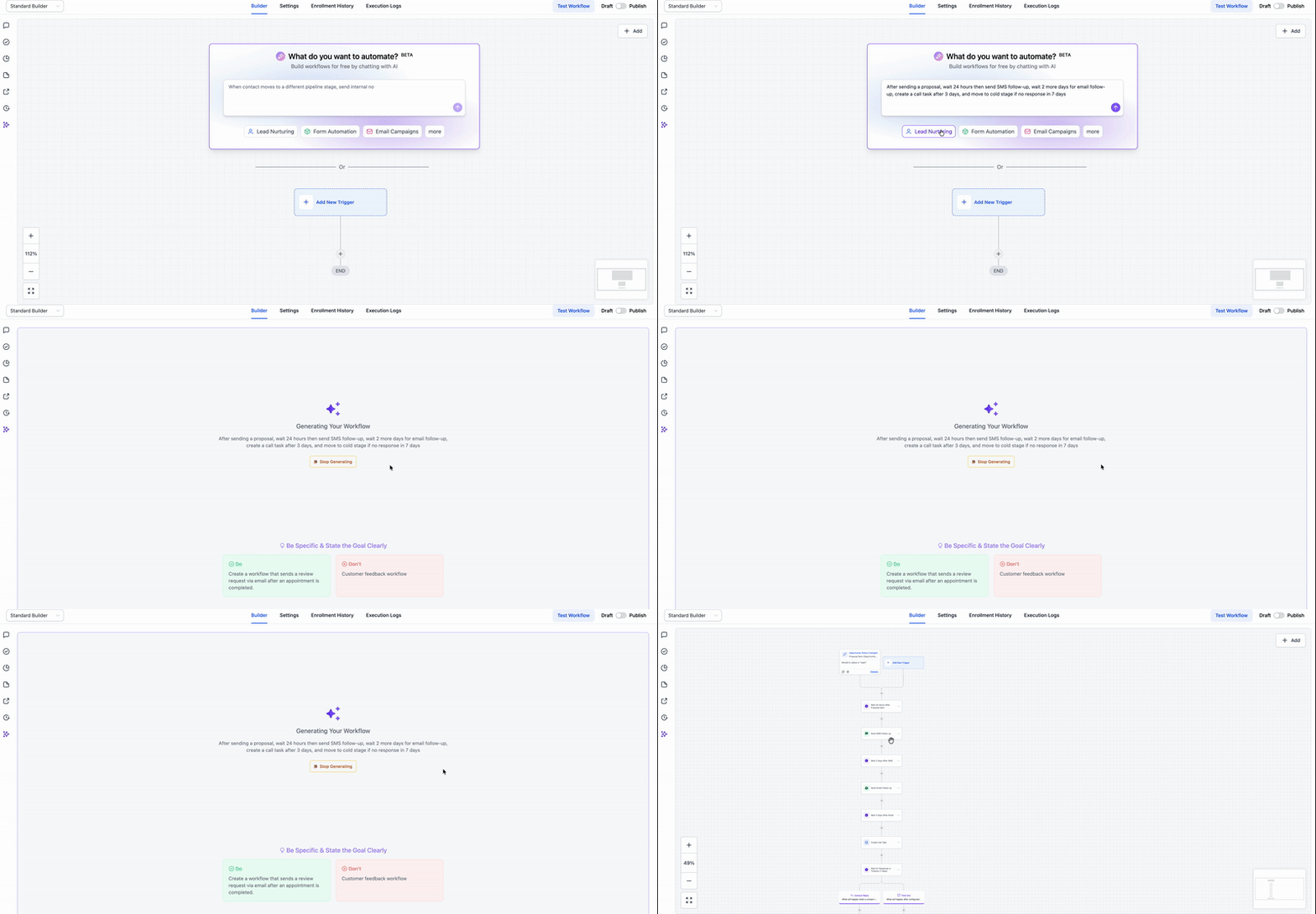
AI Workflow Builder Lightning Fast Generation
What changed
HighLevel's AI Workflow Builder generates workflows faster and feels smoother during creation.
Why it matters for LOs
Speed is helpful when you are building automations across multiple pipelines and stages. But faster drafting does not mean the workflow is correct. In the walkthrough, the builder created a structure quickly but still missed key details that would cause silent failure in a live mortgage pipeline.
Tip
Use the AI builder for the first draft only. Before publishing, manually verify:
Triggers and filters
Pipeline selection
Field mapping in every action
Any text formatting or value merges
Find Contact: Additional Email/Phone Search

What changed
The Find Contact workflow step now supports searching by phone and email, including additional emails, not just the primary email.
Why it matters for LOs
This is a real duplicate killer. Mortgage leads show up with different emails and phone numbers all the time depending on the source:
A borrower uses a work email on a form
A spouse uses their email on the next submission
A lead swaps phone numbers between ads and landing pages
Better matching means cleaner records, cleaner attribution, and fewer "why do we have three contacts for the same borrower" problems.
Tip
Put Find Contact at the top of your lead intake workflow before you create new records or opportunities.
Monday.com Actions and Triggers

What changed
HighLevel added a native monday.com integration as workflow actions. Triggers are not available yet.
Why it matters for LOs
A lot of mortgage teams use Monday for loan processing and internal task tracking. Even without triggers, actions can still push work into your processing system when something changes inside HighLevel.
Tip
Start with action-based handoffs:
Create or update a Monday item when a lead hits Application Received
Assign processing tasks when documents are marked received
Move an item when a file changes stage
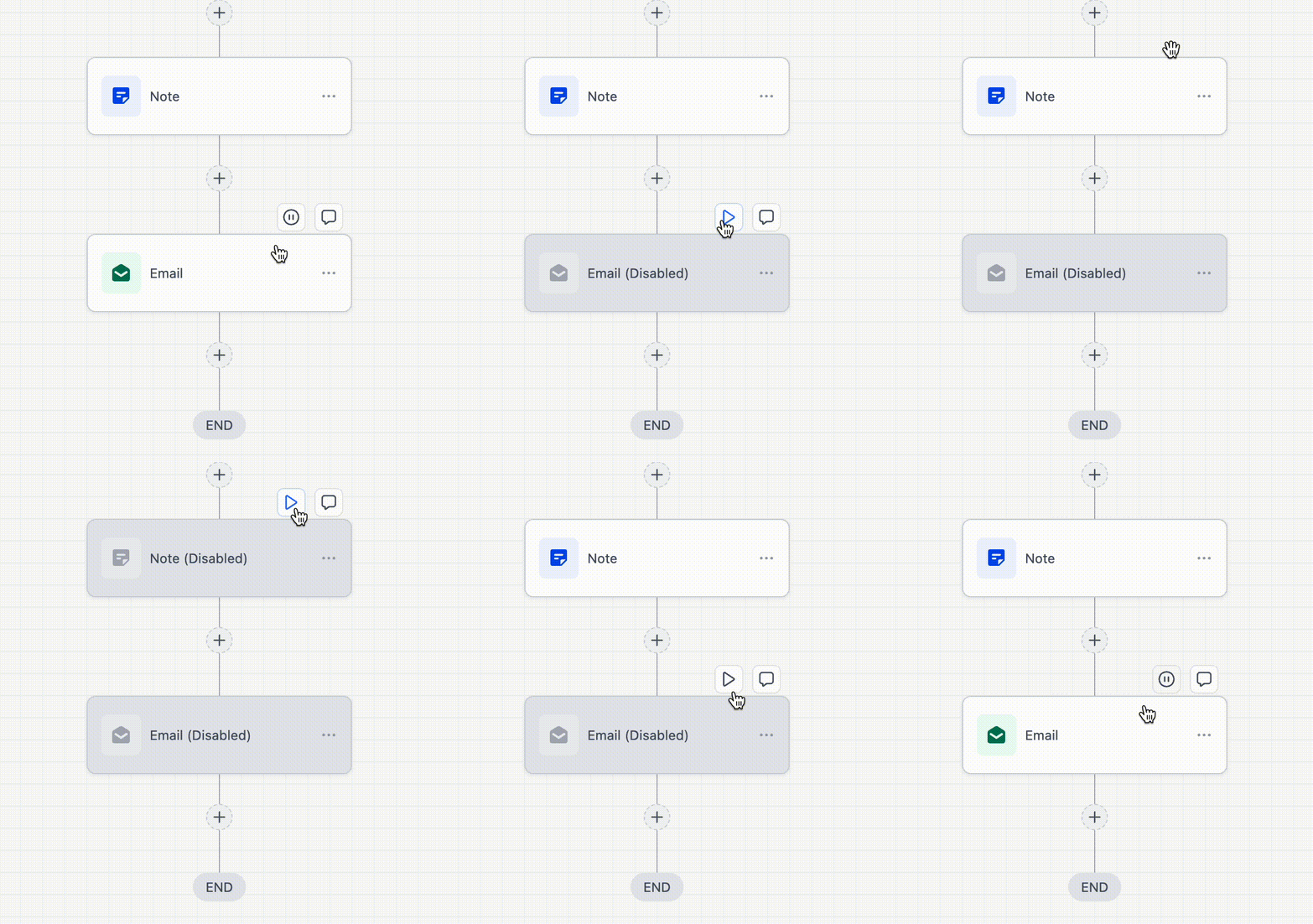
Standard Builder: Pause Workflow Actions
What changed
You can now pause individual workflow steps in the standard builder, not just the advanced builder.
Why it matters for LOs
Testing workflows without sending real messages is a must. This gives you a simple way to validate logic without blasting texts or emails while you troubleshoot.
Tip
Use step pausing for:
Testing conditional paths
Skipping send actions while validating tagging and routing
Temporarily stopping one action without disabling the entire workflow
Bulk Delete and Restore Opportunities

What changed
HighLevel now supports bulk delete for opportunities, and restore is included as a safety net.
Why it matters for LOs
If you run high volume internet leads, your pipeline fills with duplicates and junk. Bulk delete is the difference between pipeline hygiene and pipeline chaos. Restore matters because mistakes happen when you are cleaning hundreds of records.
Tip
Create a weekly cleanup routine:
Filter and select duplicates
Bulk delete the junk
Restore if you catch an accidental wipe
RSS Publishing Enhancements in Social Planner

What changed
RSS publishing in the Social Planner now supports descriptions, not just titles and links. It also formats posts based on the social platforms selected.
Why it matters for LOs
If you publish a blog weekly, RSS posting can turn that into consistent social output without extra effort. Mortgage content only works if it is consistent, and this makes consistency easier.
Tip
Use RSS posting to distribute:
Weekly market updates
First time buyer explainers
Refinance checklists
Then let HighLevel auto-format per platform.
Social Planner Widgets on Dashboard

What changed
HighLevel added Social Planner widgets to dashboards, including tracking for impressions, engagement, follower changes, and post volume.
Why it matters for LOs
Most mortgage teams do not track social performance because it is annoying and fragmented. Dashboards make it visible without extra tools.
Tip
Add three widgets to one dashboard:
Impressions over time
Followers over time
Posts by platform
Check weekly so you can tie output to lead flow.
Improved and More Flexible Email Builder UI

What changed
The email builder UI has been improved with a more intuitive layout, more editing controls, and more flexible design options.
Why it matters for LOs
Email is still a major driver for:
New lead follow up
Past client check ins
Realtor partner nurture
Rate watch campaigns
A smoother builder reduces friction, which means you ship campaigns instead of procrastinating them.
Tip
Standardize 3 templates:
New lead welcome
Partner update
Past client touch
Then duplicate and tweak instead of rebuilding.
Email AI: Beta 2.0 Better, Faster, Smarter
What changed
Email AI has improved and can pull details from Brand Boards to generate better starting templates and content blocks.
Why it matters for LOs
This helps teams get out of the blank-page problem. You still need to edit for compliance and tone, but it can generate a usable draft faster than starting from scratch.
Tip
Give it real context:
Who the email is for
What the offer is
What the next step should be
Then tighten the copy and add required disclosures.
AI-Powered A2P Compliance Validation

What changed
HighLevel now provides an automated checklist during A2P submission to help identify issues that may cause failures.
Why it matters for LOs
A2P has been a nightmare for many teams. This is not a guarantee of approval, but it speeds up troubleshooting and narrows the likely failure points before you waste time in support loops.
Tip
Treat the checklist like a preflight:
Fix anything flagged
Save screenshots if you need to escalate
Keep brand and messaging consistent across submissions
Conversation AI Auto Follow-Up (Flow-Based Builder)

What changed
The flow-based Conversation AI builder now supports auto follow up, which was previously missing.
Why it matters for LOs
This is the feature that makes the advanced builder worth revisiting. You can build structured, conditional bot logic and still ensure leads get follow up instead of stalling out after the first interaction.
Tip
Use flow-based follow up for:
After-hours lead capture
Rate quote requests
Appointment scheduling
Keep the follow up short and focused on one action.
Send Bot to Sleep Indefinitely After Manual or Workflow Message

What changed
You can now send the bot to sleep indefinitely after a message is sent manually or through a workflow by disabling bot reactivation.
Why it matters for LOs
Mortgage conversations are high trust. When a human takes over, you cannot have the bot popping back in later. Indefinite sleep gives you control and prevents awkward handoffs.
Tip
Use this only for manual takeover situations. If workflows send messages regularly, be careful. You do not want automations unintentionally turning your bot off forever.
Why These Updates Matter for Mortgage Pros
This week's batch is not flashy. It is operational. It helps you:
Draft workflows faster while avoiding silent failures
Match leads to existing records and reduce duplicates
Clean pipeline clutter in bulk
Turn blogs into social posts automatically
Track social results inside dashboards
Build emails faster with better UI and stronger AI drafts
Reduce A2P confusion with a checklist
Control bots when humans step in and enable auto follow up in advanced bot logic
Want to Go Deeper?
Join the HL4MP Community to hang out with other loan officers, see real setups, and get behind-the-scenes access to what is working in HighLevel right now. Or check out Broker Toolkit for AI newsletters, activity tracking, and rate monitoring.