This week's HighLevel updates, explained for mortgage professionals. We cut through the noise and tell you what actually matters for your business, what you can ignore, and what to set up right now.
Last week brought 26 big changes to HighLevel. This week, it's 28 more. The LevelUp summit just wrapped, and the product team clearly isn't slowing down.
This batch hits nearly every corner of the platform. Smarter Smart Lists. A new mobile UI. Bots that understand voice and images. Workflow triggers, call tools, and a much smoother way to build.
If you're a mortgage pro juggling lead follow-up, mobile dialing, and funnel automation, this update helps you move faster without missing the details.
Here's what's new this week 👇
📋 Smart Lists 2.0 & All Contacts Customization

What Changed: Smart Lists now support saved views, column reordering, duplicating, and sharing. The "All Contacts" page can now be customized just like a Smart List.
Why It Matters for LOs:
Faster access to relevant fields
Share views across teams
No more creating lists from scratch
📞 Voicemail Inbox on Dialer

What Changed: Voicemails now live in their own tab. no more digging through conversations.
Why It Matters for LOs:
Never miss a message
Centralized voicemail management
Easier call follow-up workflow
🏷️ Rename Standard Objects

What Changed: Rename default CRM objects like "Opportunities" or "Companies" to match your process (e.g., "Loans" or "Agents").
Why It Matters for LOs:
CRM matches your business language
Easier team onboarding
Custom-tailored workflows
📲 SMS Notifications for Calendars

What Changed: SMS appointment reminders can now be configured directly in the calendar without a workflow.
Why It Matters for LOs:
Easier appointment setup
Faster confirmations = fewer no-shows
Clean, direct automation
💬 WhatsApp Notifications for Calendars

What Changed: Calendars now support WhatsApp reminders natively.
Why It Matters for LOs:
Great for international clients
Works seamlessly inside calendar settings
No Zapier or workaround needed
🖼️ AI Bots Can Respond to Images

What Changed: AI bots can now understand images like IDs, credit scores, or screenshots.
Why It Matters for LOs:
More flexible intake flows
Smart replies based on image context
Higher-quality lead engagement
🎙️ AI Bots Can Respond to Voice Memos

What Changed: Bots now process voice recordings and respond conversationally.
Why It Matters for LOs:
Engage mobile-first leads
More natural interactions
Less typing = faster qualification
📆 AI Bots Support Multiple Calendars

What Changed: Conversation bots now route bookings across multiple calendars based on logic.
Why It Matters for LOs:
Match the right LO or team
Better coverage for large teams
Smooth routing = fewer dropped leads
🧠 New Flow-Based Bot Builder (V3)

What Changed: New drag-and-drop flow builder for building AI bots visually.
Why It Matters for LOs:
Easier to map lead logic
No advanced AI knowledge needed
Fast launch for intake bots
📞 Voice AI Outbound Calling

What Changed: Workflows can now trigger outbound AI voice calls to leads (Labs).
Why It Matters for LOs:
Fast reactivation with zero manual effort
Personalized voicemails
Ideal for speed-to-lead automations
📄 Call Transcript Trigger

What Changed: New trigger fires when a call transcript becomes available.
Why It Matters for LOs:
Run logic based on what was said
Kick off summaries, follow-ups, or tasks
Smarter post-call workflows
🗓️ Workflow Scheduler Trigger

What Changed: Schedule workflows based on time/date without external tools.
Why It Matters for LOs:
Perfect for event-driven sequences
More control over follow-up
Eliminates manual campaign timers

What Changed: You can now trigger and respond to Typeform submissions natively in workflows.
Why It Matters for LOs:
Map leads directly from forms
More data capture = better routing
No Zapier needed
📋 Basecamp Triggers in Workflows

What Changed: Basecamp actions and triggers now work inside workflows.
Why It Matters for LOs:
Streamlines communication with ops or processors
Keep files moving without toggling apps
Ideal for onboarding & fulfillment
💾 Auto Save in Workflow Builder

What Changed: Workflow progress now auto-saves in real time.
Why It Matters for LOs:
No more lost work
Saves time during complex builds
Safer for team collaboration
🧩 Advanced Workflow Builder Released

What Changed: Full builder redesign with modular layout, better logic paths, and multi-trigger support.
Why It Matters for LOs:
Faster to build
Easier to visualize logic
More scalable automation
🔄 Workflow Switcher

What Changed: Jump between workflows without leaving the editor.
Why It Matters for LOs:
Review logic across flows
Copy/paste steps more efficiently
Great for agency users or admins
⌨️ Keyboard Shortcuts in Builder

What Changed: Keyboard shortcuts are now available in the builder.
Why It Matters for LOs:
Speeds up building
Reduces repetitive actions
Great for frequent users
📊 Stats View, Sticky Notes & Comments

What Changed: Add notes, track step usage, and leave comments inside workflows.
Why It Matters for LOs:
Clearer documentation
Easier handoff between team members
Identify workflow bottlenecks
⏸️ Pause Workflow Steps
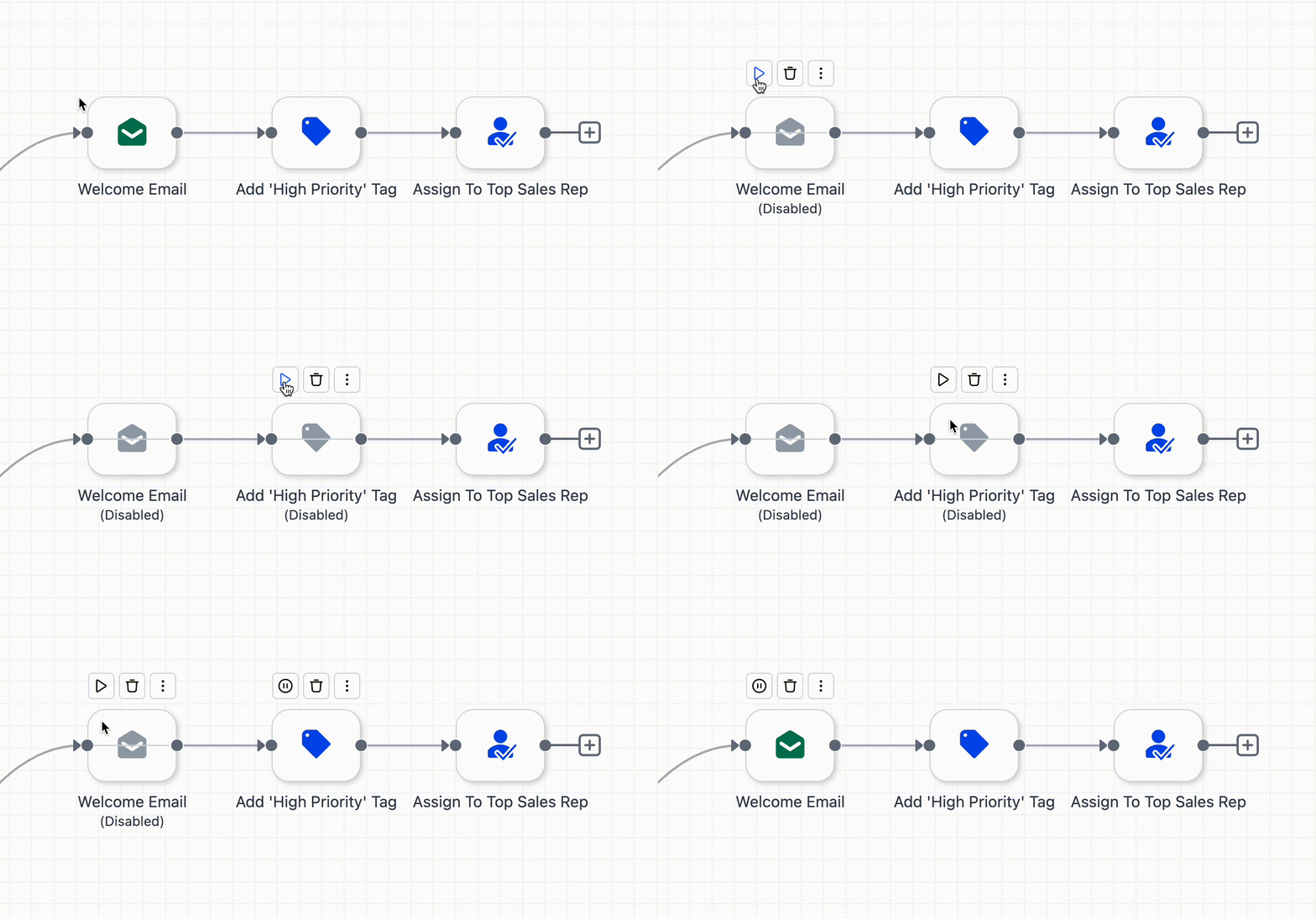
What Changed: Pause a step without deleting it to test or disable logic.
Why It Matters for LOs:
Test workflows safely
Prep without triggering leads
Makes staging easier
🧱 De-Linked Nodes in Workflows

What Changed: Start multiple logic paths from anywhere in the flow.
Why It Matters for LOs:
More flexibility for advanced builds
Handle branching without cloning flows
Easier to scale logic
🔀 Go-To Connections in Builder

What Changed: "Go To" steps now connect logic across the canvas.
Why It Matters for LOs:
Link paths cleanly
Fewer repeat steps
Advanced logic = cleaner flows
📱 New Mobile App UI/UX Overhaul

What Changed: Major redesign of the mobile app. faster, cleaner, more intuitive.
Why It Matters for LOs:
Manage deals on the go
Handle tasks, calls, and messages easily
True CRM access from your phone
🗓️ Recurring Appointments in Mobile

What Changed: Schedule recurring appointments from inside the mobile app.
Why It Matters for LOs:
Great for weekly check-ins
Saves time when scheduling
Fully mobile calendar management
📞 Multi-Location Call Routing in Mobile App

What Changed: Accept calls from multiple subaccounts inside the app.
Why It Matters for LOs:
Works for assistants or branch managers
Handles team-wide call routing
Fewer missed calls
📍 Local Presence Dialing in Mobile

What Changed: Mobile calls now show local area codes to contacts.
Why It Matters for LOs:
Increases answer rates
Better first impression
Great for cold outreach
📇 AI-Powered Business Card Scanner

What Changed: Scan a physical card and auto-fill contact info in the app.
Why It Matters for LOs:
Fast data capture at events
No more typing or errors
Syncs straight to your CRM
⚡ LeadConnector App Gets Features First

What Changed: Mobile updates now roll out faster to LeadConnector than to white-labeled apps.
Why It Matters for LOs:
Use LeadConnector for the latest features
Helps troubleshoot client-facing issues
More frequent updates = better experience
Why These Updates Matter for Mortgage Pros
This week's upgrades make HighLevel a sharper, faster tool for:
Qualifying leads through smarter bots, calls, and workflows
Managing deals on the go with a fully upgraded mobile app
Automating follow-up with more precision and personalization
Building flexible systems that match how mortgage teams actually work
For loan officers, processors, and teams juggling leads, calendars, and compliance. these updates aren't just nice-to-haves. They remove friction, tighten communication, and help you stay focused on what closes deals.
🎥 Watch the Full Weekly Breakdown
Coming off a huge release, HighLevel kept the momentum going. This week's updates double down on speed, clarity, and control from mobile UX to automation tweaks to smarter AI tools. It's a full sweep of enhancements built to support how mortgage teams actually work.
👉 Watch the full video to see how these upgrades fit into real workflows.
🔔 Join the HL4 Community for insider tips and early access: joinhl4.com
Want to Go Deeper?
Join the HL4MP Community to hang out with other loan officers, see real setups, and get behind-the-scenes access to what is working in HighLevel right now. Or check out Broker Toolkit for AI newsletters, activity tracking, and rate monitoring.